Create Custom Threat Intelligence Feeds
Maltiverse offers the possibility of creating Custom Threat Intelligence Feeds. This feature allows you to carefully select the IoCs you are going to disseminate through your security stack, allowing you to maximize your security posture based on the specific needs of your organization.
To create a custom feed, simply login to the Maltiverse Portal and follow the instructions.
1. Head to the left navigation menu and click Search (1) to go to Maltiverse’s Search engine, where you will be able to filter IoCs.
2. Filter the IoCs based on your needed criteria. For example, you can filter IoCs by typing: type:hostname AND classification:malicious AND is_alive:true. Once you type your search query, click Search or press Enter on your keyboard.
 Detailed instructions on how to filter IoCs are available in our Maltiverse Search Engine documentation.
If you filter IoCs from the Platform Search, you will only access the IoCs that you have uploaded and not the full list of IoCs available through Maltiverse Intelligence.
Detailed instructions on how to filter IoCs are available in our Maltiverse Search Engine documentation.
If you filter IoCs from the Platform Search, you will only access the IoCs that you have uploaded and not the full list of IoCs available through Maltiverse Intelligence.
3. Now that you have filtered the IoCs you can create a threat feed containing all the IoCs that meet the criteria of your search. To do so, click on the Save Query button (1).
4. Select the Threat Intel Feed option and complete the form by giving it a distinct name and a description that will help your team identify its use. Once you are done click on Save (1).
5. Once you create the custom feed, you will be directed to the feed details where you can review its contents or make use of it by:
- Downloading its contents to help with threat hunting and reporting.
- Integrate it to your security stack to disseminate the IoCs within the feed.
Keep in mind that feeds are updated in real time, meaning that IoCs that no longer fit into the filtering criteria will be removed and new IoCs that fit these criteria will be added.
Threat Feed edition
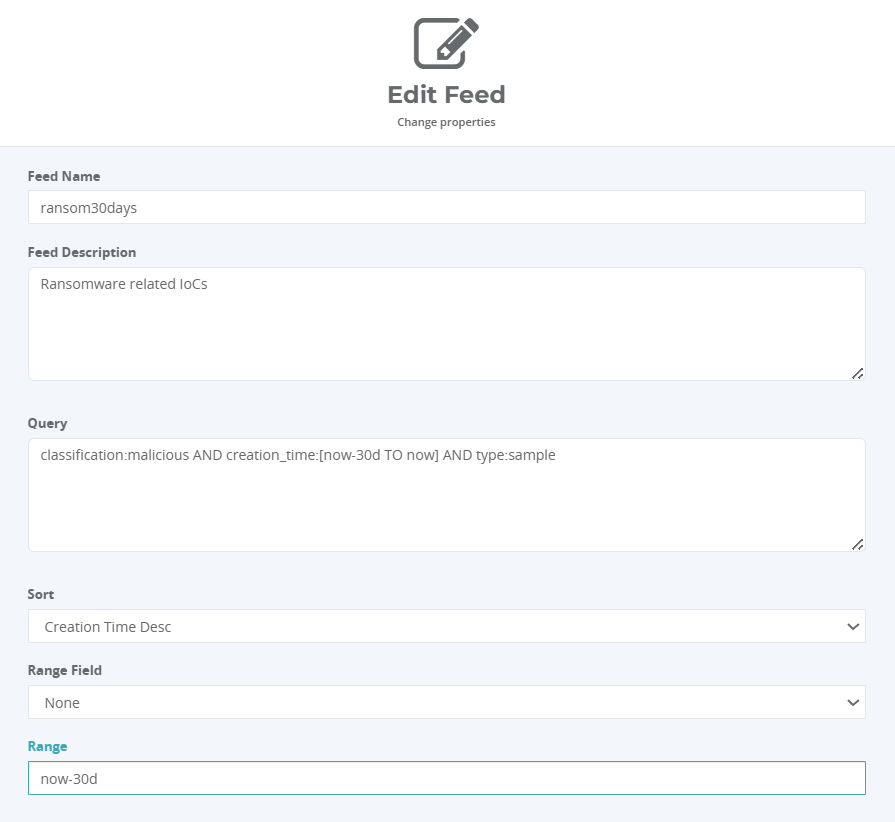 Range parameters
- Range field: Defines the filter criteria. Supports the following values.
- None
- Creation time
- Modification time
- Range: Defines the relative time window for the data export. This parameter supports Elasticsearch date math syntax, allowing for flexible relative time expressions. The data is retrieved from the specified point in the past up until the current moment (now). Here are some examples of common expressions:
- now-1h: Last hour
- now-1d: Last 24 hours
- now-7d: Last 7 days
- now-30d: Last 30 days
- now-1y: Last year
If not defined, the system uses the following as default:- range = now-30d
- range_field = modification_time